
Prepare Smarter for the CKS Exam
Build your exam confidence with flexible preparation resources designed around the latest CKS exam objectives. Practice at your own pace using PDF questions, online exam simulations, or desktop practice software.
Create a new Service Account named backend-sa in the existing namespace default, which has the capability to list the pods inside the namespace default. Create a new Pod named backend-pod in the namespace default, mount the newly created sa backend-sa to the pod, and Verify that the pod is able to list pods. Ensure that the Pod is running.
Correct Answer: A
A service account provides an identity for processes that run in a Pod.
Answer: See the
Explanation below:
When you (a human) access the cluster (for example, using kubectl), you are authenticated by the
api server as a particular User Account (currently this is usually admin, unless your cluster
administrator has customized your cluster). Processes in containers inside pods can also contact the
apiserver. When they do, they are authenticated as a particular Service Account (for
example, default).
When you create a pod, if you do not specify a service account, it is automatically assigned
the default service account in the same namespace. If you get the raw js on or yaml for a pod you
have created (for example, kubectl get pods/
name: my-pod
spec:
serviceAccountName: build-robot
automountServiceAccountToken: false
...
The pod spec takes precedence over the service account if both specify
a automountServiceAccountToken value.
Enable audit logs in the cluster, To Do so, enable the log backend, and ensure that
1. logs are stored at/var/log/kubernetes-logs.txt.
2. Log files are retained for 12 days.
3. at maximum, a number of 8 old audit logs files are retained.
4. set the maximum size before getting rotated to 200MB
Edit and extend the basic policy to log:
1. namespaces changes at RequestResponse
2. Log the request body ofsecrets changes in the namespace kube-system.
3. Log all other resources in core and extensions at the Request level.
4. Log "pods/portforward", "services/proxy" at Metadata level.
5. Omit the Stage RequestReceived
All other requests at the Metadata level
Correct Answer: A
Kubernetes auditing provides a security-relevant chronological set of records about a cluster. Kubeapiserver performs auditing. Each request on each stage of its execution generates an event, which is then pre-processed according to a certain policy and written to a backend. The policy determines what’s recorded and the backends persist the records. You might want to configure the audit log as part of compliance with the CIS (Center for Internet Security) Kubernetes Benchmark controls. The audit log can be enabled by default using the following configuration in cluster.yml: services: kube-api: audit_log: enabled: true When the audit log is enabled, you should be able to see the default values at /etc/kubernetes/auditpolicy.yaml The log backend writes audit events to a file in JSONlines format. You can configure the log audit backend using the following kube-apiserver flags: --audit-log-path specifies the log file path that log backend uses to write audit events. Not specifying this flag disables log backend. - means standard out --audit-log-maxage defined the maximum number of days to retain old audit log files --audit-log-maxbackup defines the maximum number of audit log files to retain --audit-log-maxsize defines the maximum size in megabytes of the audit log file before it gets rotated If your cluster's control plane runs the kube-apiserver as a Pod, remember to mount the hostPath to the location of the policy file and log file, so that audit records are persisted. For example: --audit-policy-file=/etc/kubernetes/audit-policy.yaml \ --audit-log-path=/var/log/audit.log
Fix all issues via configuration and restart the affected components to ensure the new setting takes
effect.
Fix all of the following violations that were found against the API server:-
a. Ensure the --authorization-mode argument includes RBAC
b. Ensure the --authorization-mode argument includes Node
c. Ensure that the --profiling argument is set to false
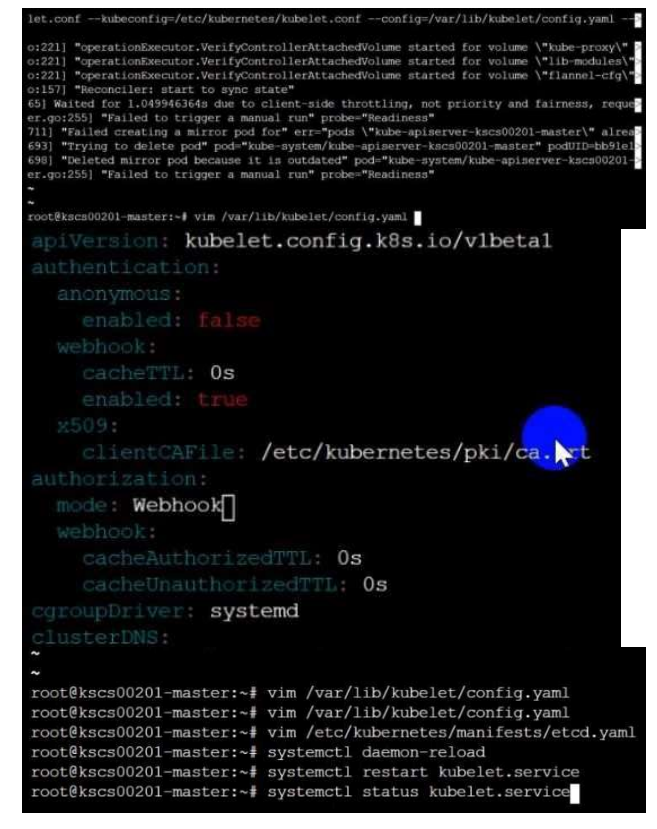
Fix all of the following violations that were found against the Kubelet:-
a. Ensure the --anonymous-auth argument is set to false.
b. Ensure that the --authorization-mode argument isset to Webhook.
Fix all of the following violations that were found against the ETCD:-
a. Ensure that the --auto-tls argument is notset to true
Hint: Take the use of Tool Kube-Bench
Correct Answer: A
API server: Ensure the --authorization-mode argument includes RBAC Turn on Role Based Access Control. Role Based Access Control (RBAC) allows fine-grained control over the operationsthat different entities can perform on different objects in the cluster. It is recommended to use the RBAC authorization mode. Fix - Buildtime Kubernetes apiVersion: v1 kind: Pod metadata: creationTimestamp: null labels: component: kube-apiserver tier: control-plane name: kube-apiserver
namespace: kube-system
spec:
containers:
- command:
+ - kube-apiserver
+ - --authorization-mode=RBAC,Node
image: gcr.io/google_containers/kube-apiserver-amd64:v1.6.0
livenessProbe:
failureThreshold: 8
httpGet:
host: 127.0.0.1
path: /healthz
port: 6443
scheme: HTTPS
initialDelaySeconds: 15
timeoutSeconds: 15
name: kube-apiserver-should-pass
resources:
requests:
cpu: 250m
volumeMounts:
-mountPath: /etc/kubernetes/
name: k8s
readOnly: true
-mountPath: /etc/ssl/certs
name: certs
-mountPath: /etc/pki
name: pki
hostNetwork: true
volumes:
- hostPath:
path: /etc/kubernetes
name: k8s
- hostPath:
path: /etc/ssl/certs
name: certs
- hostPath:
path: /etc/pki
name: pki
Ensure the --authorization-mode argument includes Node
Remediation: Edit the API server pod specification file /etc/kubernetes/manifests/kubeapiserver.yaml on the master node and set the --authorization-mode parameter to a value that
includes Node.
--authorization-mode=Node,RBAC
Audit:
/bin/ps -ef | grep kube-apiserver | grep -v grep
Expected result:
'Node,RBAC' has 'Node'
Ensure that the --profiling argument is set to false
Remediation: Edit the APIserver pod specification file /etc/kubernetes/manifests/kubeapiserver.yaml on the master node and set the below parameter.
--profiling=false
Audit:
/bin/ps -ef | grep kube-apiserver | grep -v grep
Expected result:
'false' is equal to 'false'
Fix all of the following violations that were found against the Kubelet:-
Ensure the --anonymous-auth argument is set to false.
Remediation: If using a Kubelet config file, edit the file to set authentication: anonymous: enabled
to false. If using executable arguments, edit the kubelet service
file /etc/systemd/system/kubelet.service.d/10-kubeadm.conf on each worker node and set the
below parameter in KUBELET_SYSTEM_PODS_ARGS variable.
--anonymous-auth=false
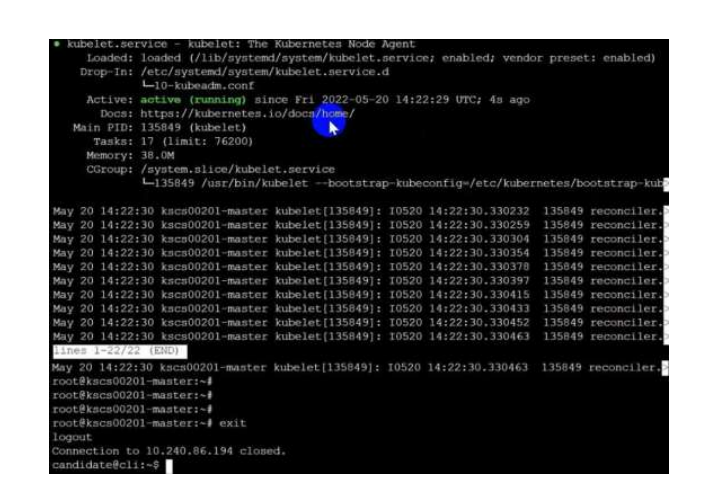
Based on yoursystem, restart the kubeletservice. For example:
systemctl daemon-reload
systemctl restart kubelet.service
Audit:
/bin/ps -fC kubelet
Audit Config:
/bin/cat /var/lib/kubelet/config.yaml
Expected result:
'false' is equal to 'false'
2) Ensure that the --authorization-mode argument is set to Webhook.
Audit
dockerinspect kubelet | jq -e '.[0].Args[] | match("--authorization-mode=Webhook").string'
Returned Value: --authorization-mode=Webhook
Fix all of the following violations that were found against the ETCD:-
a. Ensure that the --auto-tls argument is not set to true
Do not use self-signed certificates for TLS. etcd is a highly-available key value store used by
Kubernetes deployments for persistent storage of all of its REST API objects. These objects are
sensitive in nature and should not be available to unauthenticated clients. You should enable the
client authentication via valid certificates to secure the access to the etcd service.
Fix - Buildtime
Kubernetes
apiVersion: v1
kind: Pod
metadata:
annotations:
scheduler.alpha.kubernetes.io/critical-pod: ""
Expected result:
'Node,RBAC' has 'Node'
Ensure that the --profiling argument is set to false
Remediation: Edit the APIserver pod specification file /etc/kubernetes/manifests/kubeapiserver.yaml on the master node and set the below parameter.
--profiling=false
Audit:
/bin/ps -ef | grep kube-apiserver | grep -v grep
Expected result:
'false' is equal to 'false'
Fix all of the following violations that were found against the Kubelet:-
Ensure the --anonymous-auth argument is set to false.
Remediation: If using a Kubelet config file, edit the file to set authentication: anonymous: enabled
to false. If using executable arguments, edit the kubelet service
file /etc/systemd/system/kubelet.service.d/10-kubeadm.conf on each worker node and set the
below parameter in KUBELET_SYSTEM_PODS_ARGS variable.
--anonymous-auth=false
Based on yoursystem, restart the kubeletservice. For example:
systemctl daemon-reload
systemctl restart kubelet.service
Audit:
/bin/ps -fC kubelet
Audit Config:
/bin/cat /var/lib/kubelet/config.yaml
Expected result:
'false' is equal to 'false'
2) Ensure that the --authorization-mode argument is set to Webhook.
Audit
dockerinspect kubelet | jq -e '.[0].Args[] | match("--authorization-mode=Webhook").string'
Returned Value: --authorization-mode=Webhook
Fix all of the following violations that were found against the ETCD:-
a. Ensure that the --auto-tls argument is not set to true
Do not use self-signed certificates for TLS. etcd is a highly-available key value store used by
Kubernetes deployments for persistent storage of all of its REST API objects. These objects are
sensitive in nature and should not be available to unauthenticated clients. You should enable the
client authentication via valid certificates to secure the access to the etcd service.
Fix - Buildtime
Kubernetes
apiVersion: v1
kind: Pod
metadata:
annotations:
scheduler.alpha.kubernetes.io/critical-pod: ""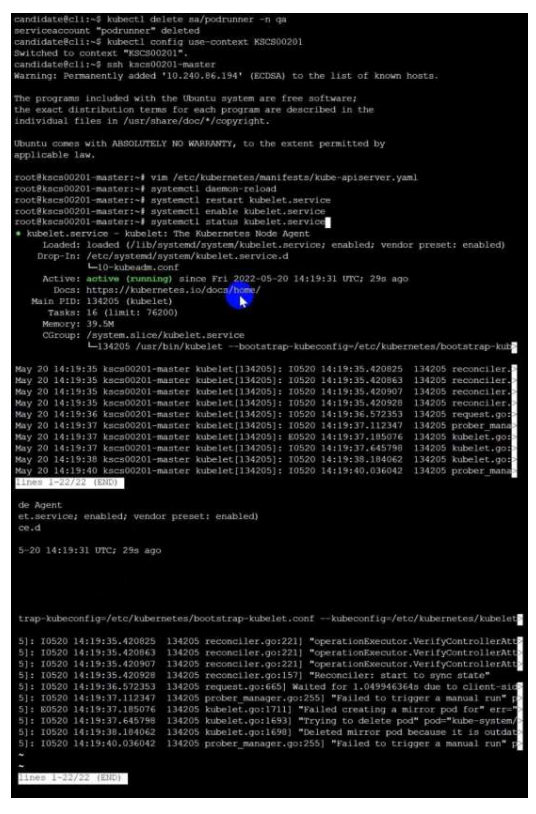
Create a PSP that will prevent the creation of privileged pods in the namespace.
Create a new PodSecurityPolicy named prevent-privileged-policy which prevents the creation of
privileged pods.
Create a new ServiceAccount named psp-sa in the namespace default.
Create a new ClusterRole named prevent-role, which uses the newly created Pod Security Policy
prevent-privileged-policy.
Create a new ClusterRoleBinding named prevent-role-binding, which binds the created ClusterRole
prevent-role to the created SA psp-sa.
Also, Check the Configuration is working or not by trying to Create a Privileged pod, it should get
failed.
Correct Answer: A
Create a PSP that will prevent the creation of privileged pods in the namespace.
$ cat clusterrole-use-privileged.yaml
---
apiVersion: rbac.authorization.k8s.io/v1
kind: ClusterRole
metadata:
name: use-privileged-psp
rules:
- apiGroups: ['policy']
resources: ['podsecuritypolicies']
verbs: ['use']
resourceNames:
- default-psp
---
apiVersion: rbac.authorization.k8s.io/v1
kind: RoleBinding
metadata:
name: privileged-role-bind
namespace: psp-test
roleRef:
apiGroup: rbac.authorization.k8s.io
kind: ClusterRole
name: use-privileged-psp
subjects:
- kind: ServiceAccount
name: privileged-sa
$ kubectl -n psp-test apply -f clusterrole-use-privileged.yaml
After a few moments, the privileged Pod should be created.
Create a new PodSecurityPolicy named prevent-privileged-policy which prevents the creation of
privileged pods.
apiVersion: policy/v1beta1
kind: PodSecurityPolicy
metadata:
name: example
spec:
privileged: false # Don't allow privileged pods!
# The rest fills in some required fields.
seLinux:
rule: RunAsAny
supplementalGroups:
rule: RunAsAny
runAsUser:
rule: RunAsAny
fsGroup:
rule: RunAsAny
volumes:
- '*'
And create it with kubectl:
kubectl-admin create -f example-psp.yaml
Now, as the unprivileged user, try to create a simple pod:
kubectl-user create -f- <<EOF
apiVersion: v1
kind: Pod
metadata:
name: pause
spec:
containers:
- name: pause
image: k8s.gcr.io/pause
EOF
The output is similar to this:
Error from server (Forbidden): error when creating "STDIN": pods "pause" is forbidden: unable to
validate against any pod security policy: []
Create a new ServiceAccount named psp-sa in the namespace default.
$ cat clusterrole-use-privileged.yaml
---
apiVersion: rbac.authorization.k8s.io/v1
kind: ClusterRole
metadata:
name: use-privileged-psp
rules:
- apiGroups: ['policy']
resources: ['podsecuritypolicies']
verbs: ['use']
resourceNames:
- default-psp
---
apiVersion: rbac.authorization.k8s.io/v1
kind: RoleBinding
metadata:
name: privileged-role-bind
namespace: psp-test
roleRef:
apiGroup: rbac.authorization.k8s.io
kind: ClusterRole
name: use-privileged-psp
subjects:
- kind: ServiceAccount
name: privileged-sa
$ kubectl -n psp-test apply -f clusterrole-use-privileged.yaml
After a few moments, the privileged Pod should be created.
Create a new ClusterRole named prevent-role, which uses the newly created Pod Security Policy
prevent-privileged-policy.
apiVersion: policy/v1beta1
kind: PodSecurityPolicy
metadata:
name: example
spec:
privileged: false # Don't allow privileged pods!
# The rest fills in some required fields.
seLinux:
rule: RunAsAny
supplementalGroups:
rule: RunAsAny
runAsUser:
rule: RunAsAny
fsGroup:
rule: RunAsAny
volumes:
- '*'
And create it with kubectl:
kubectl-admin create -f example-psp.yaml
Now, as the unprivileged user, try to create a simple pod:
kubectl-user create -f- <<EOF
apiVersion: v1
kind: Pod
metadata:
name: pause
spec:
containers:
- name: pause
image: k8s.gcr.io/pause
EOF
The output is similar to this:
Error from server (Forbidden): error when creating "STDIN": pods "pause" is forbidden: unable to
validate against any pod security policy: []
Create a new ClusterRoleBinding named prevent-role-binding, which binds the created ClusterRole
prevent-role to the created SA psp-sa.
apiVersion: rbac.authorization.k8s.io/v1
# This role binding allows "jane" to read pods in the "default" namespace.
# You need to already have a Role named "pod-reader" in that namespace.
kind: RoleBinding
metadata:
name: read-pods
namespace: default
subjects:
# You can specify more than one "subject"
- kind: User
name: jane # "name" is case sensitive
apiGroup: rbac.authorization.k8s.io
roleRef:
# "roleRef" specifies the binding to a Role / ClusterRole
kind: Role #this must be Role or ClusterRole
name: pod-reader # this must match the name of the Role or ClusterRole you wish to bind to
apiGroup: rbac.authorization.k8s.io
apiVersion: rbac.authorization.k8s.io/v1
kind: Role
metadata:
namespace: default
name: pod-reader
rules:
- apiGroups: [""] # "" indicates the core API group
resources: ["pods"]
verbs: ["get", "watch", "list"]
ocumentation Deployment, Pod, Namespace
You must connect to the correct host . Failure to do so may result in a zero score.
[candidate@base] $ ssh cks000028
Context
You must update an existing Pod to ensure the immutability of its containers.
Task
Modify the existing Deployment named lamp-deployment, running in namespace lamp, so that its containers:
. run with user ID 20000
. use a read-only root filesystem
. forbid privilege escalation
The Deployment ' s manifest file con be found at /home/candidate/finer-sunbeam/lamp-deployment.yaml.
Correct Answer: A
1) Connect to the correct host
ssh cks000028
sudo -i
2) Use the right kubeconfig (safe in exam)
export KUBECONFIG=/etc/kubernetes/admin.conf
3) Open the provided Deployment manifest
vi /home/candidate/finer-sunbeam/lamp-deployment.yaml
4) Edit ONLY the Pod template security settings (add/modify these fields)
Inside:
spec: - > template: - > spec:
4.1 Set container to run as user 20000
Add (or change) under the container securityContext::
securityContext:
runAsUser: 20000
4.2 Make root filesystem read-only
In the SAME container securityContext: ensure:
readOnlyRootFilesystem: true
4.3 Forbid privilege escalation
In the SAME container securityContext: ensure:
allowPrivilegeEscalation: false
✅ The container section should look like this (example — keep your existing image/ports/etc):
spec:
template:
spec:
containers:
- name: < your-container-name >
image: < unchanged >
securityContext:
runAsUser: 20000
readOnlyRootFilesystem: true
allowPrivilegeEscalation: false
If there are multiple containers , apply the same securityContext to each container .
Save and exit:
wq
5) Apply the manifest (updates Deployment - > recreates Pods)
kubectl -n lamp apply -f /home/candidate/finer-sunbeam/lamp-deployment.yaml
6) Wait for rollout
kubectl -n lamp rollout status deployment/lamp-deployment
7) Verify the security settings are live
7.1 Check the Pod is running
kubectl -n lamp get pods -l app=lamp -o wide
(if label differs, just kubectl -n lamp get pods)
7.2 Verify the three fields on a running Pod
Pick the Pod name and run:
POD=$(kubectl -n lamp get pods -o jsonpath= ' {.items[0].metadata.name} ' )
kubectl -n lamp get pod $POD -o jsonpath= ' {.spec.containers[0].securityContext.runAsUser}{ " \n " }{.spec.containers[0].securityContext.readOnlyRootFilesystem}{ " \n " }{.spec.containers[0].securityContext.allowPrivilegeEscalation}{ " \n " } '
Expected output:
20000
true
false
If the pod fails after readOnlyRootFilesystem=true
Don’t change the requirement (task demands it). Usually the app needs writable dirs via volumes, but the task doesn’t ask for that—so only adjust if the manifest already has volumes and just needs these securityContext fields.