
Prepare Smarter for the CPC-SEN Exam
Build your exam confidence with flexible preparation resources designed around the latest CPC-SEN exam objectives. Practice at your own pace using PDF questions, online exam simulations, or desktop practice software.
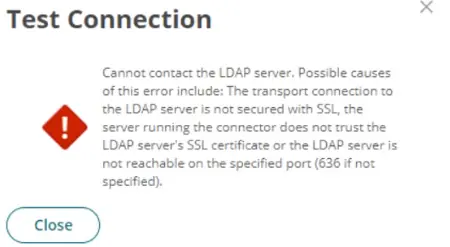
Refer to the exhibit.
You set up your LDAP Directory in CyberArk Identity, but encountered an error during the connection test.
Which scenarios could represent a valid misconfiguration? (Choose 2.)
Correct Answer: A, C
From the error message provided, two likely scenarios could represent valid misconfigurations:
TCP Port 636 could be blocked by a network firewall, preventing communication between the CyberArk Identity Connector and the LDAP Server (A).
This is a common issue where firewall settings prevent the secure communication port (typically 636 for LDAPS) from transmitting data between
the server and the connector, thus blocking the connection attempt.
'Verify Server Certificate' is activated but the provided hostname is not listed as a Subject Alternative Name (SAN) in the LDAP server's certificate (C).
This scenario occurs when SSL/TLS security measures are stringent, requiring that the hostname used to connect to the LDAP server must match one listed in the server's SSL certificate.
If the hostname does not match, the connection will fail due to SSL certificate validation errors.